
Introduction to Cloudflare Workers
I’ve recently started working on bringing myself up to speed on the Cloudflare Dev Platform, which is a serverless development platform that runs your applications at the edge (and Cloudflare has more than 300 points of presence, so the edge is fairly spread out). This is the first in a series that will go through all the major features of the Cloudflare Dev Platform, but attempt to make some sense out of what each feature is best at and what works well together.
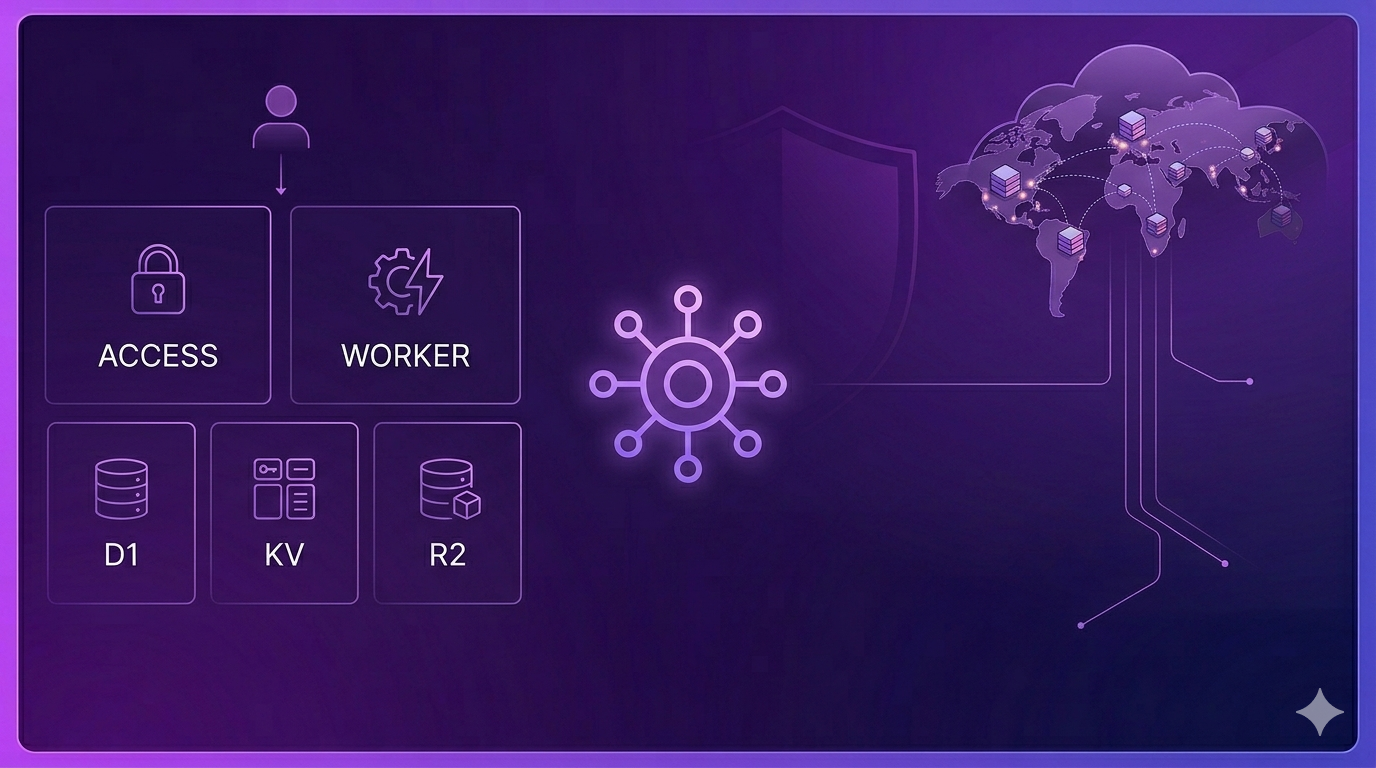
Let’s say you are using Cloudflare already. Cloudflare is well known for their CDN and DDoS protection. You use those features to ensure your users have a good experience by mitigating threats and moving static content nearer to the users. Something like 95% of the Internet is within 50ms of a Cloudflare POP. The next logical step is to move the dynamic content to the edge as well. That’s what the Cloudflare Dev Platform is for.
Building a basic app
Let’s think about what goes into a basic data-driven app:
- Compute: you need to be able to run code.
- Structured data store: you need to persistently store data in SQL or NoSQL.
- Object store: you need to persistently store file-like things.
- Identity: you need to authenticate users.
Each of the serverless platforms has “something” for this. In Cloudflare, these are easily hooked together:
- Compute: Workers
- Data stores: D1 and Workers KV
- Object store: R2
- Identity: Cloudflare Access
Here is what a basic app looks like:
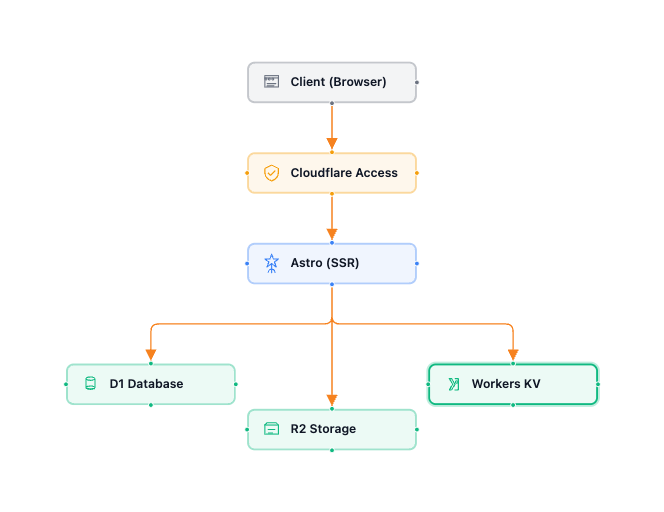
You may be wondering how I created this diagram. The app I wrote for my investigation is a canvas based application with this exact architecture. You can find the source code on my GitHub repository.
I don’t actually do any coding any more. I use agentic coding frameworks. This one was written using OpenCode with Claude Opus 4.6 for planning and Kimi K2.5 for coding. You can certainly go and view my source code, but I’m more interested in architecture than code these days.
Let’s take a look at each piece:
Cloudflare Workers
Cloudflare Workers is a serverless execution platform that operates on the globally distributed Cloudflare network. Unlike traditional serverless functions that spin up heavy containers (such as those provided by AWS, GCP, and Azure), Workers utilize V8 isolates. These are lightweight sandboxed environments that can start in under a millisecond. It’s the same technology that keeps your browser tabs isolated. This architecture significantly reduces cold starts, reducing time-to-first-byte and overall application latency.
Unfortunately, Cloudflare Workers is an overused term on the platform. This description doesn’t cover Workers AI, Dynamic Workers, or Workers for Platforms. I’ll cover those features later on.
Cloudflare D1
Cloudflare D1 is a serverless relational database built on SQLite and designed to provide low-latency SQL capabilities directly within the Workers runtime. It’s a robust storage layer that eliminates the need for external database connections or complex connection pooling. For read-heavy applications, D1 utilizes global read replication to serve data from points of presence closer to the user, while the Sessions API ensures sequential consistency to prevent “reading your own stale write” issues often found in distributed database solutions. This makes it a versatile choice for everything from local hobby projects to complex SaaS backends.
While D1 excels at high-concurrency, small-scale relational tasks, its primary trade-off remains the single-writer nature of SQLite. It is optimized for high-volume reads and efficient, small-batch writes. When this is not a suitable trade-off, I recommend looking at Hyperdrive for connecting a hyperscaler-hosted MySQL or PostgreSQL database. Hyperdrive turns a hosted MySQL/PostgreSQL database into an edge-ready resource by pooling connections to drastically reduce the latency of the initial handshake with the database, and by caching query results for common queries.
Cloudflare Workers KV
Cloudflare Workers KV is a globally distributed, eventually consistent key-value storage solution optimized for high-read, low-write workloads. Unlike a traditional database, Workers KV replicates data across Cloudflare’s network, allowing for sub-10ms “hot” reads. This makes it an ideal fit for configuration management, feature flags, user session data, and routing tables where rapid access is critical but a propagation delay for updates is acceptable. Each value can be as large as 25MB and the platform supports millions of requests per second without requiring manual scaling or infrastructure management.
While KV offers exceptional global performance, it has specific architectural constraints to keep in mind. It is designed for “read-heavy” patterns, meaning it excels when you read a key far more often than you update it; in fact, there is a performance guideline of roughly one write per second per key to avoid rate-limiting or consistency issues. Because it is eventually consistent, it should not be used for tasks requiring strict atomic transactions or immediate “read-your-own-write” guarantees globally.
Cloudflare R2
Cloudflare R2 is an S3-compatible object storage service distinguished primarily by its zero-egress fee model, which eliminates the often unpredictable data transfer costs associated with traditional cloud providers. It offers two distinct storage classes: Standard and Infrequent Access, the latter being ideal for logs or long-tail content that is rarely retrieved. Because it is built on Cloudflare’s global network, R2 allows for highly performant data delivery without the “egress tax” typically incurred when moving data from a storage bucket to a CDN or a separate compute environment.
In typical data-driven applications, this will be where you store generated artifacts, but it is also commonly used to store training data for LLMs, for log aggregation, and for enabling automated workflows like image processing or real-time log analysis. Cloudflare has also integrated a serverless data warehouse, allowing you to query data in place without moving it to a separate analytics engine. I’m not taking advantage of any of thise (yet).
Cloudflare Access
Cloudflare Access is from the Zero Trust security layer that Cloudflare provides and is useful even if you are not implementing Cloudflare as a corporate ZTNA/SASE layer. It’s an identity layer that sits in front of your Workers, transforming them from public endpoints into secure tools. Instead of managing complex authentication logic inside your code, Access handles the identity verification at the edge before the request even reaches your Worker.
When a user or service attempts to reach a Worker protected by Access, Cloudflare checks for a valid session. If non exists, the user is redirected to your configured Identity Provider. Once authenticated, Access generates a JSON Web Token and attaches it to the request as a CF-Authorization cookie or header.
Since Access sits “in front” of the Worker, your code can be sure that any request reaching it has already passed initial gatekeeping. If you want to provide personalized capabilities, you can use the get-identity endpoint or a public key set from your Access team domain to extract user metadata (such as their email address) and implement granular role-based access controls.
In terms of providers, you have your choice of the major ones. You can use a “one-time PIN”, which will ask for your email, send a one-time PIN to that email to allow you to prove your identity, and then let you in. You can also use Microsoft Entra ID, Okta, Google, Facebook, GitHub, Apple, LinkedIn, or your own OIDC provider. You also have an additional capability of supporting scripts or agents by utilizing a client ID/client secret authentication mechanism.
I’ve written more about Cloudflare Access than the rest of the features and still not scratched the surface of its capabilities. Needless to say, I think Cloudflare Access is an under-reported superpower for the Cloudflare Dev Platform.
Tools
As with most cloud-based applications, you’ll want to consider tooling. There are two phases for deploying an application - first-run, where you set everything up, and then continuous deployment.
- First Run: You could set everything up by hand in the dashboard. I don’t recommend it once you’ve played around a little. Instead, use Terraform and the Cloudflare v5 provider to automate the deployment. You can deploy your database, KV, R2, and Access requirements all in one shot, grabbing the service identities you need later on.
- Deployment: Set your application up to use
wrangler, which will allow you to run the application locally and deploy it to the Cloudflare Dev Platform.
Wrangler uses “bindings” to link your Cloudflare services (like D1 and R2) to your Worker. It does this by embedding the ID of the service into a wrangler.jsonc file. There are other formats (such as TOML), but let’s keep this simple. Here is the problem. You don’t know the ID until you run the first-run.
To get around this, I use the following scripts in my package.json file:
firstrun- runsterraform applyto create the infrastructure.postfirstrun- runsupdate-config.mjsto edit thewrangler.jsoncin place based on the outputs from the terraform process.deploy- runswrangler deployto deploy the codedev- runswrangler devto run locally
If you use npm run firstrun, your wrangler.jsonc is updated for your environment and you can run the workers locally.
Limitations
Like all serverless platforms (and Cloudflare competes with AWS Lambda, Google Cloud Functions, and Azure Functions in this arena), there are some limitations. Because Workers share resources across the global network, there are strict caps on the size and complexity of your code. Paid plans generally are more generous than the free plan.
- Script size: 1MB (Free) / 10MB (Paid) - compressed size
- Memory: 128MB
- Subrequests: 50 (Free) / 1000 (Paid) per request
- CPU time limit: 10ms (Free) / 50ms (Paid) of actual CPU work (although can be increased some times)
128MB is pretty lean, so be careful with libraries. Fortunately, Hono (for API handling), Drizzle (for database ORM), and Kysely (for database SQL) are all very lean. This is why those libraries in particular are heavily used in Cloudflare Workers.
Cloudflare Workers are based on V8 isolates, which are really fast. However, if your script takes too long to evaluate, it will fail to deploy or run. This often happens because of massive node_modules dependency trees. Because they run on V8 isolates, you are not allowed binary dependencies (usually some older encryption or image libraries) and there is no fs module (or other Node.js specific modules). Cloudflare has added support for many APIs (like Buffer, AsyncLocalStorage, and EventEmitter). It is still a compatibility layer and some obscure or legacy Node modules will fail.
Finally, workers are stateless. We’ll get into how you can get around this limitation in a future article, but you cannot store a variable in memory and expect it to be there for the next request. Workers primarily handle HTTP/HTTPS, which means you cannot host a generic “TCP server” on a worker.
Final thoughts
I created an app that allows me to create and share architecture diagrams. It is based on Astro and React and uses D1, KV, and R2. I’m really rather pleased with how it turned out. I did learn some things:
-
Optimize D1 with Batching and Indexes
D1 performance is tied to how you interact with its SQLite core. Every separate
db.prepare().run()call is a round-trip. Usedb.batch([...])to send multiple SQL statements in a single request. This is significantly faster for bulk inserts or complex updates.Just like any other database, D1 requires proper indexes on columns used in
WHEREclauses. Without them, you’ll quickly hit CPU limits on large tables due to full table scans. -
Use
ctx.waitUntil()for non-blocking tasksData-driven apps often need to log analytics, update a cache in KV, or send telemetry after a request is finished. Don’t make the user wait for these tasks. Wrap them in
ctx.waitUntil(promise). This allows the Worker to send the response to the user immediately while keeping the isolate alive just long enough to finish the background work. -
Leverage Wrangler Types and Compatibility Dates
Wrangler can make your bindings type safe. Run
wrangler typesto generate TypeScript interfaces for your D1, KV, and R2 bindings. This prevents runtime errors caused by typos in your environment variables.Always keep your
compatibility_dateinwrangler.jsoncup to date. This ensures you have access to the latest performance improvements and nodejs_compat flags for using standard libraries. -
Implement cryptographic JWT validation
If you use Cloudflare Access, don’t just trust that a request is safe because it reached your Worker. Manually verify the
Cf-Access-Jwt-Assertionheader. You’ll see some code in a middleware block in my codebase. This ensures that even if a firewall rule is accidentally disabled, your data remains protected. -
Utilize the Cloudflare Worker Skills
Cloudflare publishes a set of commands, rules, MCP servers, and skills for you to use with your Agentic coding platform. I use OpenCode, but they also work with Claude Code, Cursor, and Codex. I suspect they also work with anything else. My agents coding skill improved with these capabilities.
When you look at the Cloudflare Dev Platform, you will see generous (and I mean GENEROUS) free tier limits, and paid capabilities that don’t require you to tear down and re-architect when you want to change tiers. It’s a platform that allows you to start small for free and grow into capabilities that you don’t even know you need yet. Along the way, your work is protected by one of the best edge security platforms in the business.
It doesn’t do everything, but it does enough that I am guessing 80+% of the apps you are thinking of right now can be implemented on the Cloudflare Dev Platform. The ones that can’t be implemented likely need access to your corporate database or legacy platforms.
Disclosure: I work for Cloudflare. This article is my own thoughts developed while learning the platform and may not represent the opinion of Cloudflare.
Leave a comment