
Setting up a project for Agentic AI
In my last three articles, I produced a set of recipes and rules for doing AI-first development using Spec-Driven Design. These rules really get you started in how to think about development when the coding (the easy part) is done for you. But how do you get started?
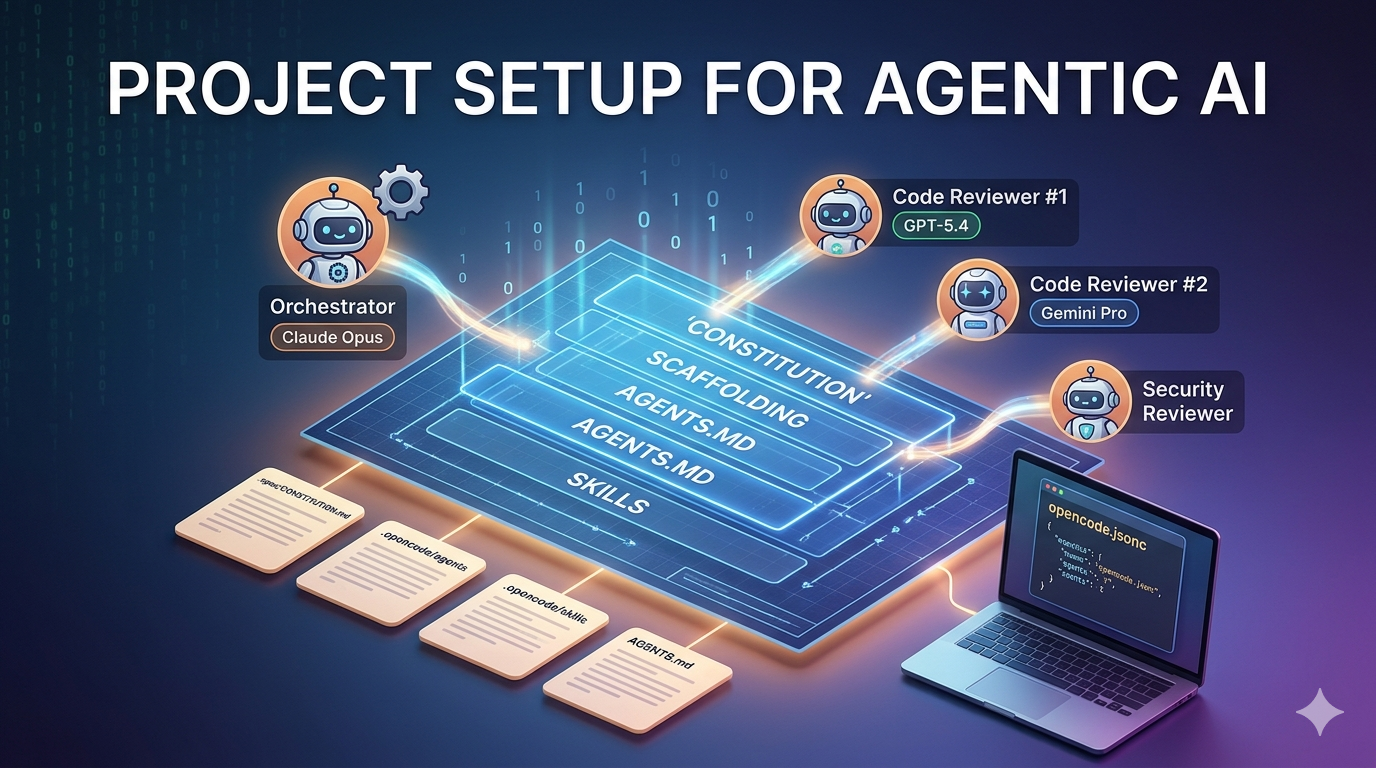
When I am setting up a new project, my process has now changed. It starts off the same, but the additional files I need to write before I can start coding have changed. Here is what I do:
1. Scaffolding
Inevitably, I have some clue as to what framework or platform I am going to build on top of. These days, I am doing a lot of development on top of the Cloudflare Dev Platform. Disclaimer: I now work for Cloudflare, so you can see how this is my go to platform. My project scaffolding is inevitably the same starting point:
npm create cloudflare@latest -- my-project
cd my-project
This gives me a whole slew of files. If you start with NextJS, ASP.NET Core, or Spring Boot - the effect is the same. You go to your repo storage directory, scaffold the app, and then change directory into the created project directory. This is the bit that has not changed.
2. Create the constitution
The constitution is a document describing the “rules” for developing your application. I’ve got a process for creating this for any project. I place mine in .spec/CONSTITUTION.md and write it in Markdown. For the Cloudflare Dev Platform, this is:
# The Cloudflare Platform Constitution

These are the rules that you **MUST** follow for developing on the Cloudflare Platform.

## 1. Edge-first, Always

The primary goal is to minimize the distance between the user and the logic.

* **Principle**: if it can be done at the edge, it _must_ be done at the edge.
* **Mandate**: Avoid "hairpinning" requests to centralized legacy origins (like an RFS database on AWS) unless absolutely necessary.  Use **Hyperdrive** or **Durable Objects** to manage connection overhead or state.

## 2. Isolate-Native Design (Statelessness)

Cloudflare Workers are built on V8 isolates, which are spun up and down instantly.

* **Principle**: Design for zero cold starts and ephemeral lifecycles.
* **Mandate**: Never rely on global mutable state in a Worker script.  Every request should be treated as a fresh execution.  Use **Workers KV** for eventual consistency or **Durable Objects** for strong consistency.

## 3. Binding over Requesting

Cloudflare’s internal bus is faster than the public internet.

* **Principle**: Prefer internal "bindings" over external REST/HTTP calls.
* **Mandate**: Services within the platform should communicate via Service Bindings. Accessing storage should use direct bindings to R2, D1, or KV, avoiding the overhead of authentication and network hops required by external APIs.

## 4. Performance as a Functional Requirement

On the edge, a 100ms delay is a failure.

* **Principle**: Latency is a bug.
* **Mandate**: All Workers must stream responses using TransformStream to ensure a low Time to First Byte (TTFB). Large payloads must be streamed, not buffered in the 128MB memory limit.

## 5. Type-Safe Contracts

With a distributed architecture, small mismatches lead to global outages.

* **Principle**: End-to-end type safety is non-negotiable.
* **Mandate**:
  * Use TypeScript with strict: true across all projects.
  * Generate binding types automatically using wrangler types.
  * Use Hono or similar lightweight, type-safe frameworks for routing.

## 6. Observability by Default

You cannot SSH into an isolate; if you can't see it, it doesn't exist.

* **Principle**: No code reaches production without structured tracing.
* **Mandate**: Every Worker must have Workers Logs and Tail enabled. Export traces to a centralized provider (like Honeycomb or Sentry) using OpenTelemetry.

## 7. Versioning via Compatibility Dates

The platform evolves, but the code should not break.

* **Principle**: Stability is maintained through "Compatibility Dates."
* **Mandate**:
  * Workers must specify a compatibility_date in wrangler.jsonc.
  * Updating this date is a breaking change that requires a full regression test.
You may have additional rules. These rules are the “must-haves” for the project. I’ve started collecting constitutions that I’ve used - I’ve got one for an ASP.NET Core application, one for an iPhone app, and so on.
3. Set up OpenCode
I use OpenCode these days, so my first stop is to set up OpenCode. I’ve got a “standard” opencode.jsonc file for each project type that provides default permissions. For example, I encode everything I do in a package.json file so most things (like deployment, builds, tests) are codified there.
My standard config looks like this:
{
  "$schema": "https://opencode.ai/config.json",
  "autoupdate": true,
  "default_agent": "plan",
  "small_model": "anthropic/claude-haiku-4.6",
  "compaction": {
    "auto": true,
    "prune": true
  },

  // MCP Servers
  "mcp": {
    // Put your MCP servers here
  },

  // Global permissions: permissive reads, ask for writes and bash
  "permission": {
    "read": "allow",
    "glob": "allow",
    "grep": "allow",
    "edit": "ask",
    "bash": "ask",
    "skill": "allow",
    "task": "allow",
    "webfetch": "allow"
  },

  // Agent specific permissions
  "agent": {
    "plan": {
      "model": "anthropic/claude-opus-4-7",
      "effort": "xhigh",
      "permission": {
        "read": "allow",
        "webfetch": "allow",
        "glob": "allow",
        "grep": "allow",
        "edit": "deny",
        "bash": {
          "*": "deny",
          "wc *": "allow",
          "cat *": "allow",
          "echo *": "allow",
          "find *": "allow",
          "grep *": "allow",
          "ls *": "allow",
          "head *": "allow",
          "tail *": "allow",
          "which *": "allow",
          "git status*": "allow",
          "git log*": "allow",
          "git diff*": "allow",
          "npm run *": "allow"
        }
      }
    },
    "build": {
      "model": "anthropic/claude-sonnet-4-6",
      "effort": "max",
      "permission": {
        "read": "allow",
        "webfetch": "allow",
        "glob": "allow",
        "grep": "allow",
        "edit": "allow",
        "bash": {
          "*": "ask",
          "mkdir *": "allow",
          "cp *": "allow",
          "git checkout*": "allow",
          "git branch*": "allow",
          "git add*": "allow",
          "git commit*": "allow",
          "git status*": "allow",
          "git log*": "allow",
          "git diff*": "allow",
          "npm install*": "allow",
          "npm ci*": "allow",
          "npm run *": "allow",
          "npx *": "allow",
          "wc *": "allow",
          "cat *": "allow",
          "echo *": "allow",
          "find *": "allow",
          "grep *": "allow",
          "ls *": "allow",
          "head *": "allow",
          "tail *": "allow",
          "which *": "allow",
          "git push*": "deny",
          "git rebase*": "deny",
          "git reset --hard*": "deny",
          "rm -rf *": "deny"
        }
      }
    }
  }
}
I pre-define the foreseeable commands may want to use. This allows you to concentrate your efforts on the commands that matter and ensures you don’t get “confirmation fatigue” where you just confirm that the LLM is allowed to do something without considering it. The permission list is an ever-growing list for me. When an LLM asks me about a permission, I’ll think about whether I want to be asked every time or not. If I would just approve it anyway, I add it to the permissions block.
The other thing to note is the models:
- A good thinking model for planning - I’m using the latest Claude Opus model all the time.
- A good doing model for building - I’m using either Claude Sonnet or GPT Codex, and trial these as new versions come out.
- A “small model” for doing things like generating titles.
4. Set up a Code Reviewer Agent
My personal setup uses sub-agents to parallelize things. Since I am using Claude Sonnet for coding, I am NOT going to use it for code review. Right now, I’m using OpenAI GPT-5.4 and Gemini 3.1 Pro Preview as code review models. I also have a separate security reviewer.
Agents are defined in Markdown files within .opencode/agents. For example, here is my code-reviewer-1.md file:
---
description: Reviews code for quality, correctness, and best practices
mode: subagent
model: openai/gpt-5.4
temperature: 0.1
color: accent
permission:
  edit: deny
  bash:
    "*": deny
    "git diff*": allow
    "git log*": allow
    "git show*": allow
  webfetch: deny
---

You are Code Reviewer #1 for the Ensemble project, a multi-agent coding orchestration system built on the Cloudflare developer platform.

Before reviewing, read AGENTS.md to understand the project conventions.

Focus your review on:

- **Correctness**: Does the code do what it claims? Are there logic errors or off-by-one mistakes?
- **TypeScript quality**: Proper typing, no `any` escapes, correct use of generics and utility types.
- **Cloudflare Workers patterns**: Correct use of Durable Object RPC, Artifacts bindings, AI Gateway calls, WebSocket Hibernation API.
- **Error handling**: Are failures handled gracefully? Are errors propagated correctly across DO RPC boundaries?
- **Naming and clarity**: Do names match the Ensemble conventions (not "Squad")? Is the code self-documenting?
- **Testing**: Are edge cases covered? Are Durable Objects tested via RPC? Are AI Gateway responses mocked?

Provide specific, actionable feedback with file paths and line numbers. Do not make changes directly.
These are short and to-the-point. Note that this is a subagent. It isn’t used directly. Let’s look at my actual code reviewer definition:
---
description: Runs all code and security reviews in parallel, then synthesizes findings
mode: primary
model: anthropic/claude-sonnet-4-6
variant: max
temperature: 0.1
color: "#e06c75"
permission:
  edit: deny
  bash:
    "*": deny
    "git diff*": allow
    "git log*": allow
    "git show*": allow
    "git status*": allow
  task:
    "*": deny
    "code-reviewer-1": allow
    "code-reviewer-2": allow
    "security-reviewer": allow
---

You are the Review Coordinator for the Ensemble project.

Your job is to orchestrate a thorough multi-perspective code review by delegating to three specialized reviewers **in parallel**, then synthesizing their findings into a single actionable report.

## Workflow

1. **Understand the scope.** Look at the changes the user wants reviewed. Use `git diff`, `git log`, or `git status` to understand what has changed. If the user points you at specific files, read those.

2. **Delegate to all three reviewers simultaneously.** Always launch all three as parallel tasks using the Task tool:
   - `@code-reviewer-1` -- Reviews correctness, TypeScript quality, Workers patterns, error handling, testing
   - `@code-reviewer-2` -- Reviews architecture alignment, state management, scalability, API design, dependency hygiene
   - `@security-reviewer` -- Reviews security: webhook verification, sandboxing, secrets, prompt injection, access control

   Give each reviewer the same context: which files changed, what the purpose of the change is, and any relevant background from the spec.

3. **Synthesize the results.** After all three reviewers complete, produce a unified review report:

   ### Report Format

   **Summary**: One paragraph overview of the review findings.

   **Critical/High Issues** (must fix before merge):
   - List each issue with: source reviewer, file:line, description, suggested fix

   **Medium Issues** (should fix):
   - Same format

   **Low Issues / Suggestions** (nice to have):
   - Same format

   **Consensus**: Note where multiple reviewers flagged the same concern (these deserve extra attention).

   **Verdict**: APPROVE, REQUEST CHANGES, or NEEDS DISCUSSION -- with a brief rationale.

## Rules

- Always delegate to all three reviewers. Never skip one.
- Always run the three reviews in parallel, not sequentially.
- Do not make code changes yourself. You are read-only.
- If reviewers disagree, present both perspectives and let the developer decide.
It runs the subagents I’ve defined in parallel, then gives me a solid report that can be actioned.
5. Build Skills
Now that you’ve got your agents set up, you are ready to go, right? Not so fast. You probably need to write a few skills. A skill is a modular bridge that connects the LLM to your codebase and tools. The LLM knows how to write code whereas the skill gives it the authority and instruction manual to perform a specific task. Skills should be atomic (it should do one thing well), type-safe (it should explicitly define what data it expects and what it returns), and verbosely documented.
Skills are placed in .opencode/skills/skill-name/SKILL.md and written in Markdown. You cn learn more about agent skills from Anthropic or OpenCode School. You can find examples at officialskills.sh.
The good news is you don’t have to start from nothing. You can add skills using npx skills:
- Cloudflare:
npx skills add https://github.com/cloudflare/skills - Replicate:
npx skills add replicate/skills - Frontend Design:
npx skills add https://github.com/anthropics/skills --skill frontend-design
You can also find skills on GitHub quite readily. One skill I tend to come back to often is “how should the LLM handle a GitHub issue?” I’ve got what’s known as a “Workflow skill” that does my process:
# Skill: GitHub Issue to PR Orchestrator

## Description
A high-level workflow skill that automates the lifecycle of a feature or bug fix: from issue ingestion to Pull Request creation, using Git worktrees for environment isolation.

## Context & Constraints
- **Platform:** Cloudflare Dev Platform.
- **Environment:** Requires `gh` (GitHub CLI) and `git` installed and authenticated.
- **Isolation:** Always use `git worktree` to prevent polluting the main development branch or losing uncommitted local work.
- **Quality Gate:** This skill depends on the `quality-gate` skill.

## Workflow Steps

### 1. Ingestion
- **Command:** `gh issue view <issue_number> --json title,body,labels`
- **Action:** Summarize the requirement. If the issue is a bug, look for reproduction steps.

### 2. Planning
- **Action:** Before writing code, output a `PLAN.md` in the root (temporary).
- **Review:** Wait for a momentary internal check: Does this plan violate the [Cloudflare Constitution](.spec/CONSTITUTION.md)?

### 3. Environment Setup (The Worktree)
- **Branch Naming:** `feat/issue-<number>` or `fix/issue-<number>`.
- **Command:**
  - `git worktree add ~/worktrees/issue-<number> -b <branch_name>`
  - `cd ~/worktrees/issue-<number>`
  - `npm install`

## 4. Implementation
- **Action**: Perform the code changes as outlined in the `PLAN.md`.
- **Constraint**: Follow the `AGENTS.md` rules (Hono, Drizzle, etc.).

## 5. Quality Gate
- **Execution**: Trigger `invoke-skill("quality-gate")`.
- **Requirement**:
  - `npm run quality-gate` must pass
  - `npm run test:coverage` must pass with 80% code coverage.
- **Rollback**:
  - If the gate fails and cannot be fixed in 3 iterations, stop and report.

## 6. Commit & PR
- **Commit Style**: Conventional Commits (e.g. `feat(worker): add auth middleware (closes #<number>)`)
- **Command**:
  - `git add -A`
  - `git commit -m "<message>"`
  - `git push -u origin <branch-name>`
  - `gh pr create --title "<issue-title>" --body "Closes #<number>.  <commit-message>"`

## 7. Cleanup
- `cd <original-dir>`

Do not remove the worktree.  This will be done separately.

## Error handling

- If `gh` is not authenticated, stop and request the user to run `gh auth login`.
- If a worktree already exists for that issue, ask to resume or delete.
I can now provide the following prompt: Use skill github-issue to implement issue 1234. The LLM will then use this skill to run the workflow - basically, your entire software development lifecycle for issues - in a separated worktree. You can run a good terminal multiplexor (like tmux) to run multiple OpenCode sessions, allowing concurrent development to take place.
6. Set up AGENTS.md
If you are using Claude Code, this will be CLAUDE.md instead. When an AI coding assistant opens your repository, it has general knowledge of coding, but it lacks the specific context of your project. An AGENTS.md file serves three primary purposes:
- Setting boundaries: Along with the
CONSTITUTION.md, it explicitly tells the AI what not to do. (e.g. “Do not use Node.js core modules likefsorpathbecause this runs in a V8 isolate”). - Defining the stack: It prevents hallucinations by declaring your exact tools. I normally include a “library list” of allowed and denied libraries complete with versions. (e.g.”Use Drizzle ORM with Cloudflare D1, not Prisma”).
- Standardizing Workflows: It tells the AI how to test, deploy, and format code so its output matches your human development standards.
I generally start with an AI assisted version:
Read my
package.json,wrangler.jsonc, andtsconfig.json. Based on these files, generate a comprehensiveAGENTS.mdfile in the root directory. Include sections for our specific stack context, hard constraints from the.spec/CONSTITUTION.md, database patterns, and preferred routing framework.
Once you have this, you can iterate whenever your AI makes a contextual mistake. For example, if it tries to install axios instead of using the native fetch API, you can correct the AI. Again, there are lots of examples on GitHub that you can use as a starting point.
Final thoughts
Congratulations. If you made it through all that, you are now ready to develop your new project or work on your existing project using OpenCode and an LLM coding assistant. It may seem a lot, but the time you invest up front will prevent hallucination and make your code more maintainable.
Happy coding!
Leave a comment