
Maintaining state in a serverless world: Cloudflare Durable Objects
When you look at the Cloudflare Developer Platform, you will quickly start drawing parallels between what Cloudflare provides and what the hyperscalers (such as AWS and Azure) provide. Sure, there are technical differences. However, you can build with the same basic primitives:
| Service | Cloudflare | AWS | Azure | GCP |
| Compute | Workers | Lambda | Functions | Cloud Functions |
| Database | D1 | Aurora | SQL | Cloud SQL |
| Object Store | R2 | S3 | Storage | Cloud Storage |
There is pretty much a 1-for-1 match for every service you might use in a serverless application, allowing you to put them together to solve problems in cloud-native ways. However, there is one that is only available on Cloudflare and it solves a very important problem: how do you make a stateful application when the underlying protocol is stateless and your compute can go away at any point?

Durable Objects are one of those platform features that are just incredibly useful. They underpin a lot of other Cloudflare services (such as Workflows, Containers, Waiting Room, Dynamic Workers, and Browser Rendering - none of which I have gone in-depth with yet). In the serverless world, you want your services to do one thing. Durable Objects merge compute, state, and coordination into a single unit while still letting you pay only for the CPU time you consume. Confused? Not surprising - I was too.
The best way to think of a Durable Object is as a globally unique, single-threaded, persistent virtual actor.
It’s still a V8 isolate - so you are going to have the same restrictions as a worker. In fact, you’ll almost always have a worker for feeding requests to the Durable Object (and that’s a good thing). It’s got its own SQLite database, which allows you to store persistent state. It acts as a handler for WebSocket connections, allowing you to coordinate multiple clients while still being able to hibernate when things are idle.
Let’s take a typical chat room. In Azure, you’d have to have a Static Web App, Function, Web Pub/Sub, and Redis Cache. In AWS, you’d likely have an S3 bucket, DynamoDB, and AppSync service linked together. In both these cases, you’d have to sort out how you are going to represent chat rooms in the API and database and coordinate sending to a small group. In Cloudflare, you’d have the same Worker hosting your static assets and HTTP API, and a Durable Object hosting the WebSocket. Each Durable Object is a copy of a stub, and you’d have one Durable Object per chat room. This provides a mental model that is much easier and state transitions that are much easier to rationalize. Bonus points - it’s much easier to test.
The video series I watched from Database School went into a lot of detail - I am not normally a fan of video courses, but this one goes in-depth without introducing cognitive burden too early, and I can highly recommend it. If you prefer, Cloudflare has a number of examples in its documentation.
So, where can you use Durable Objects?
1. The “Single Source of Truth” model
In a standard serverless environment, if 100 users connect to a service, this might be hitting 100 different instances of a function. Coordination requires a fast external database or pub/sub bus.
With Durable Objects, you can ensure that all 100 users are routed to the exact same instance of code running in a specific data center. This instance has its own private, persistent storage on disk. The Durable Object is also a single-threaded asynchronous actor, which means you know that requests are handled strictly in the order received unless you decide to break that (by awaiting a promise - await is a yield point that allows a new request to start). This simplifies transactional models. You may still need transactions for other reasons, but you won’t need transactions because you are handling multiple requests concurrently.
That isn’t to say that you don’t need to think about state. There is durable state (stored in the database) and ephemeral state (stored in memory). When the Durable Object hibernates, the ephemeral state is still lost. However, when the next request wakes up the Durable Object, your object will have the same ID (i.e. it hits the same object in the same location) and the state you’ve persisted to the private database still exists.
2. WebSocket hibernation
This one threw me for a loop. Normally, connecting WebSockets requires a host. You need to manage the WebSockets and keep them alive. They need care and attention. In the hyperscaler worlds, you’ll use persistent services for this (e.g. Web Pub/Sub in the Azure case). WebSockets are persisted by the Cloudflare Dev Platform, which allows the handling Durable Object to go to sleep without disconnecting your clients.
3. Scalability
You can run a LOT of Durable Objects from the same entry point Worker. This led me to really think about architecture in a serverless world. I’ve been thinking about a serverless MUD for a couple of years and it’s always felt “heavy”. Sure, I could write it as a set of functions and Redis Cache and Web Pub/Sub, but I end up paying for idle time - the MUD is not really serverless - it’s always awake.
With Cloudflare, I finally implemented a proof of concept that matched my desire - a solid architecture that makes sense with one Durable Object per “map zone”, and scale-to-zero built in. Each Durable Object can handle about 32,000 WebSocket connections, which is plenty for what I am imagining and it allows me to spread the load. With some architecture help from a coordinator broadcast function, I could easily see reaching a million plus users.
Note: The 32K WebSocket connection limit is not a Cloudflare enforced limit. Rather, it is a rough approximation based on the amount of CPU time and the number of operations per second that a Durable Object can handle. You may find you can handle much more or much less depending on your workload.
What can you use Durable Objects for?
So, what are the good use cases for Durable Objects? They are useful in two cases - firstly, when you want to maintain state between requests by multiple clients (users or agents). As an example, the video course I mentioned above uses an auction system as an example. Users can put in bids in over a period of time, so when you run an auction, you want to record the list of bids, who is bidding, and what the current high bid is. Secondly, when you need to coordinate multiple clients in real time - think chat rooms, shared white boards, or games. Each of these has an event loop and multiple clients working together that need to receive events from other clients.
The Serverless MUD architecture
As I’ve said previously, I’m all about the architecture these days. However, this is one application I’m writing for myself with only a little help from AI (mostly around algorithms that are cut and paste). It’s not because AI can’t write this MUD. It can definitely write this application. It’s because I need to get my hands dirty with coding every now and then to assure myself that I understand the basics.
So, let’s look at the basic architecture:
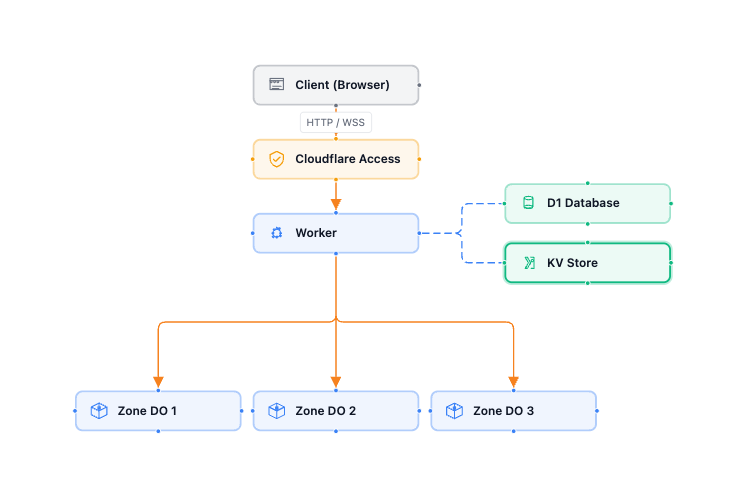
I haven’t got there yet, but you can see my current stat on my GitHub repository. At this point, you can run pnpm run dev and get a working platform that passes messages between two or more users.
Some notes for you to consider while reviewing this code set:
-
I had some initial trouble with authentication when running locally. Cloudflare Access is not available when you run
pnpm run dev. To solve this, I created a smallcloudflare-authlibrary. It acts as a middleware for Hono or Astro and does pretty much the same thing as the One-time PIN setup in Cloudflare Access. This allows you to run things that are normally protected by Cloudflare Access locally. You add the following to your Hono setup:import { Hono } from "hono"; import { api } from "./api"; import { developerAuthentication, cloudflareAccess, type AuthVariables, type PathPolicy } from "@lib/cloudflare-auth"; import { createLogger } from "@lib/cloudflare-logging"; // This is my Durable Object. export { ZoneProcessor } from "./zone-processor"; // Authentication Policies - use these to make some things non-authenticated const authPolicies: PathPolicy[] = [ { pattern: /^\/api\/version$/, authenticate: false }, { pattern: /^\/api\//, authenticate: true } ]; /** Root Hono application bound to the Worker `Env`. */ const app = new Hono<{ Bindings: Env; Variables: AuthVariables }>(); // Developer authentication simulates Cloudflare Access when running // locally. In production (behind real Access) it is a transparent no-op. const devAuthLogger = createLogger("dev-auth", { minLogLevel: "warn" }); app.use(developerAuthentication({ policies: authPolicies, logger: devAuthLogger })); // Cloudflare Access middleware validates the JWT (real or dev-generated) // and sets `userEmail` / `userSub` on the Hono context. const accessLogger = createLogger("cf-access"); app.use(cloudflareAccess({ policies: authPolicies, logger: accessLogger })); // Hook in my API router to the Hono route. app.route("/api", api); // Catch-all: after auth middleware and API routes, serve static assets // (the React SPA) via the ASSETS binding. app.all("*", async (c) => { return c.env.ASSETS.fetch(c.req.raw); }); export default app;If you want your static assets to be authenticated, then it’s important to include the ASSETS binding and the last few lines. You can set up proper assets binding in your
wrangler.jsonclike this:"assets": { "not_found_handling": "single-page-application", "run_worker_first": true, "binding": "ASSETS" },With this setup, all requests go through the worker first. The catch-all (
app.all()) sets the requests for static assets from the binding. -
I also had issues with logging. I wanted a modular logger that I could silence when running tests, yet still get nicely formatted logs in dev and structured logging in production. I created
cloudflare-logginglibrary for this. You’ll see it set up throughout my application. -
My Durable Object -
zone-processor.tshas an RPC method (getHealth()) - you can trace how this gets called via the/api/healthendpoint in the worker. It also has all the setup for hibernating web sockets, so it’s a really good file to concentrate on to see how this stuff works. -
Make sure you use the hibernating WebSocket API that Cloudflare provides. Don’t use
ws.accept()- usestate.acceptWebSocket()instead. This allows your Durable Object to hibernate while keeping your web sockets connected, which reduces your billable CPU time. -
I’ve got another file called
communication.ts. It deals with the mapping of users to web sockets, handling maintenance of the map across hibernation and maintaining the map across connection, disconnection, and errors. It also has a “broadcast” method that lets you send one message to the originating user and a different message to everyone else. This is perfect for MUD style communication. -
I decided to submit requests via a HTTP POST and use the WebSocket for broadcasting events. I think this will be more efficient in the long run and better serve my use case.
Final thoughts
I am really happy where my work on my Serverless MUD landed. Obviously, I’m going to continue working on this. It’s barely a good communication medium, let alone a fully-fledged MUD. Despite that, it has all the requirements necessary to move forward.
Durable Objects are the secret sauce for serverless applications. They allow you to maintain state when you have ephemeral stateless services - and that’s huge, especially when trying to meet the promise that serverless brings - CPU time billing with scale from zero to infinity.
Durable Objects are also the baseline for so many other things at Cloudflare - including AI agents and workflows - the next two capabilities I’m going to be looking at.
Leave a comment