
The AI Maturity Model
I have a confession to make. I don’t write code any more, and I haven’t written any code since August of last year. I wrote a little about my journey to AI nirvana (see my posts on AI Editors, OSS AI Editors, or SpecKit). I’m guessing that everyone goes through the same journey - from distrusting that AI will do a good job to using AI for everything.
The good news is that software development has not really changed. The job was never about the code, even though the code was the tangible output of the work. It was about understanding problems, designing systems, thinking about edge cases and failure modes, and ensuring that a user has a great experience when using the product. None of that has changed (and yes, AI has made even this bit easier - but not replaced it yet).
I came up with an AI Maturity Model - you can map your experience onto it and thus determine what you should be investigating to take better advantage of AI facilities.
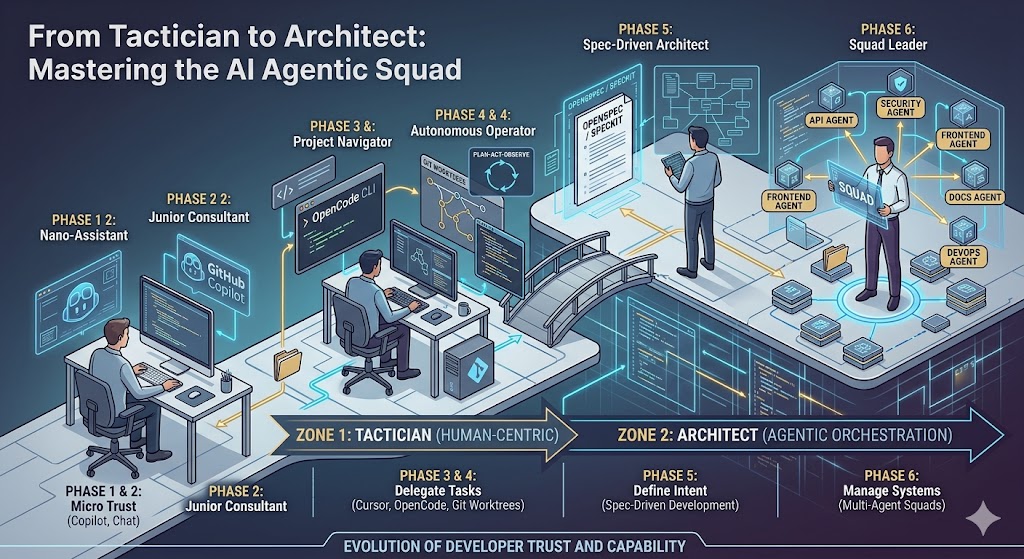
Stage 1: The Nano Assitant
- Trust Level: You trust the AI to finish a sentence.
- Control Level: You are the driver; it’s the power steering.
My journey started in Visual Studio Code. GitHub Copilot was installed and all of a sudden, the in-editor prompts improve. Yeah - that’s AI doing that. It’s not in your face. Sometimes it was a single line; sometimes it was a whole function.
The problem, as I saw it when I was in this phase, is that the AI should have been reading my mind. However, it’s just predicting the next word and so it got it wrong as often as it got it right. It also didn’t write it exactly as I would. I didn’t trust it, so I spent a lot of time pressing escape to substitute my own code.
No, you aren’t vibe-coding yet. The editor is just introducing a more intelligent helper.
Stage 2: The Junior Consultant
- Trust Level: You trust the AI to explain a block of code or refactor a function.
- Control Level: Side-bar chat. You provide snippets; it provides advice.
At some point, you give in and try the chat function. After all, it’s always sitting there begging to be used. You start with some basic stuff. Mine was with my OSS Project - the Datasync Community Toolkit. There is a pretty hairy piece of logic for synchronizing data. I figured it can’t hurt. It walked me through what was happening. At this point, I could see the bug and proceeded to correct it myself (with some help for AI-assisted auto-complete).
GitHub Copilot had added ask and edit mode, so I did do a few sessions where I highlighted a piece of code, and told it what was going on. It then told me what the code should be, and I just told it to implement it.
You are still not vibe-coding, but you are developing trust in the code that the AI writes.
Stage 3: The Project Navigator
- Trust Level: You trust the AI to find things across your whole repository.
- Control Level: It’s answering complex questions and doing multi-file editing, but you still have an opt-out and review all the code it writes.
So, you download Cursor or add in a new plugin (maybe continue.dev or cline). These all index your source code, so you can start asking more complex questions (like “how does authentication work in my repo?”) and doing multi-file edits (like “implement rate-limiting on the API surface”). The AI will dutifully determine what is going on and make all the edits for you. You can cycle through each change and decide whether to accept it or not.
You’ll get more and more trust here, and probably decide not to babysit the AI any more. If it works and the tests pass, why bother? This is the point at which you decide the code is not important.
Congratulation, you are now vibe-coding. Coincidentally, this is also the time you are likely to buy a subscription to a coding AI service like Anthropic.
Stage 4: The Autonomous Operator
- Trust Level: You trust the AI to run commands, fix bugs, and execute “Plan -> Act -> Observe” loops.
- Control Level: You give a high level goal; it navigates the files and runs tests until it’s fixed.
At some point, you’ll wonder why you are in the editor at all. After all, the AI is doing all the work. You are just doing some prompting; you’ve learned that context is king, so your prompts become files. You want to do more because the AI is actually helping now.
This is the point at which you learn about Claude Code or OpenCode. You live in the terminal so you can run multiple sessions at the same time. You learn about git worktrees to manage independent work streams. You are likely trusting the AI to review the code in a pull request.
Yes, you are still vibe-coding. Vibe-coding is when you write everything in a prompt and allow the AI to go at it until complete. It will miss edge cases, be badly designed, and not maintainable. However, it’s great for a proof-of-concept.
Stage 5: The Spec-Driven Architect
- Trust Level: You trust the AI to interpret a blueprint rather than a prompt.
- Control Level: You write the blueprint; the AI writes the code; you review the code.
You’ll have a bad experience vibe-coding that will require you to undo hours of work. You will feel frustrated, but you are a software engineer. You need to re-assert your design mandate. Enter spec-driven design, most notably via SpecKit or OpenSpec.
You are still in the terminal, but also are back in the editor. You start with the prompt for the idea, but - instead of telling the AI to just go do it - you ask it to create a blueprint instead. SpecKit and OpenSpec work pretty much the same way. The blueprint becomes a contract, work breakdown is done, edge cases are discussed. The files are much larger. But no code is being written.
When you are happy with the spec, you can now determine how many agents are going to work on it. Some work will have predecessors, but some work will be able to be done in parallel. Once the work is done, you’ve got a product with tests, CI/CD, and a user manual. The smaller context that this technique provides allows for more precision. You aren’t writing code, but you are directing and managing the work.
You’ve entered the realm of agentic engineering and can now call yourself an AI Engineer or Agentic AI Engineer on your resume.
Stage 6: The Squad Leader
- Trust Level: You hire a team of specialized agents to collaborate.
- Control Level: You are a manager of intelligence - you define the vision, set the constraints, and verify the final integration
This is the last step in your journey. In Stage 5, you were the organizer of the agents, kicking off each agent in turn in separate terminals. In Stage 6, you delegate that to an orchestrator agent and it decides which agents to fire up. You can, quite literally, spend a couple of hours refining your spec on a Friday afternoon and then leave the agent squad to it over the weekend.
The tools here are Squad or CrewAI - they work in slightly different ways, but the ultimate goal is the same - you are the architect and the AI agents are your development team. Let them do their job.
And yes, this is where I am now. I don’t know if there will be another stage, but I’m definitely more productive now than I was six months ago, despite not writing code. You just have to remember why you became a software engineer in the first place - to build compelling products.
Final thoughts
You’ll notice that there are pairs of stages here, with an early and late stage:
- The Tactician, using AI as a tool.
- The Lead Dev, delegating coding to the AI.
- The Architect, orchestrating multiple agents to fulfill a vision.
No matter where you are in the journey, it’s about the level of trust you have in the AI to do the right thing, and the level of control you give up to become more productive.
I now spend my time thinking up ideas. Half the time, those ideas are similar enough to someone elses idea that I have to decide whether I still want to do it. But when I do want to do something, I’ve got the tools and the skills to do a good job.
Leave a comment